Haven Fullscreen (that works)

Ask, answer and discuss any and all topics about the hows, whys, wheres and whens of playing Haven & Hearth.

Haven Fullscreen (that works)

Postby IsThisRad » Thu Jul 30, 2026 5:32 pm

I was tired of having to play Haven in a window since fullscreen, to this day, is a pain and sometimes white screen shits itself for no reason. For the three people similarly bothered that are looking for a solution after the fact:

You can use legacy Borderless Gaming (not the Steam Version, why would this even be on Steam) here to make it work seamlessly with no setup blah blah blah: https://legacy.borderlessgam.ing/
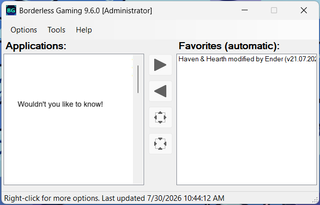
Image
Run the game and move it to the right, and as long as it's open in your system tray it'll fullscreen automagically on open.

Anyway, if this is spyware... not sorry! Good luck.
Server Error Image
The request handler is overloaded
User avatar
IsThisRad
 
Posts: 31
Joined: Fri Aug 19, 2022 5:49 am

Return to How do I?

Who is online

Users browsing this forum: Claude [Bot]
