Amber Client

Forum for alternative clients, mods & discussions on the same.
User avatar
wafflecat
Posts: 260
Joined: Thu Dec 15, 2011 7:46 pm

Re: Amber Client

Post by wafflecat »

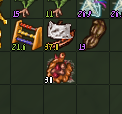
Heya. Any news on the font size issue? Here's a lil screenie showing 8 and 0. Can't really tell that stuff apart and it's really hard on the eyes.
Image
I tried changing the windows res but that didn't help. Looked all around for any settings on Java's end but nothing that can help.

Cheers
User avatar
romovs
Posts: 1472
Joined: Sun Sep 29, 2013 9:26 am
Location: The Tabouret

Re: Amber Client

Post by romovs »

1MoreGamer wrote:i open it up and it works fine but then it closes
Error from the error window or content of hs_err_pid* file if there is one wouldn't hurt :P
RamboMesser wrote:

Code: Select all

haven.Defer$DeferredException: haven.Defer$CancelledException: Execution cancelled
Amber told me to report this, so i did...
Thanks! Will fix.
wafflecat wrote:Heya. Any news on the font size issue? Here's a lil screenie showing 8 and 0. Can't really tell that stuff apart and it's really hard on the eyes.
[img]image[/img]
I tried changing the windows res but that didn't help. Looked all around for any settings on Java's end but nothing that can help.

Cheers
I started tinkering with full-screen mode and resolution changing the other day, but can't seem to make it work smoothly and on all OSes, so no promises.
What OS and what resolution do you use btw?
User avatar
wafflecat
Posts: 260
Joined: Thu Dec 15, 2011 7:46 pm

Re: Amber Client

Post by wafflecat »

romovs wrote:
wafflecat wrote:Heya. Any news on the font size issue? Here's a lil screenie showing 8 and 0. Can't really tell that stuff apart and it's really hard on the eyes.
[img]image[/img]
I tried changing the windows res but that didn't help. Looked all around for any settings on Java's end but nothing that can help.

Cheers
I started tinkering with full-screen mode and resolution changing the other day, but can't seem to make it work smoothly and on all OSes, so no promises.
What OS and what resolution do you use btw?
Using Windows 7, resolution 1920x1080.
Thanks for taking the time to work this out :D
Priss
Posts: 16
Joined: Tue Jun 04, 2013 9:37 pm

Re: Amber Client

Post by Priss »

Problems with Russian localization:
1) Cannot initiate chat with any kin. Pressing "Чат" (Chat) do nothing. With english interface all work fine.
2) Ctrl+Shift+LMC on item bring wiki with "Russian term (English term)" rather that old "English term". Of cource there is no russian pages on english HH wiki...
3) Some localization errors. Not just awkward translation, but simply errors, like: "Split" -> "Пасщепить" (must be "Расщепить"). I can accumulate errors and bring them later if it is of any need.

P.S. And dead animals STILL show red aggro radius as was mentioned some time ago...
User avatar
romovs
Posts: 1472
Joined: Sun Sep 29, 2013 9:26 am
Location: The Tabouret

Re: Amber Client

Post by romovs »

wafflecat wrote:
Using Windows 7, resolution 1920x1080.
Hmm might be not resolution related then. It should work fine on 1920.
Does it happen only to quality numbers or other texts as well?

Priss wrote:Problems with Russian localization:
1) Cannot initiate chat with any kin. Pressing "Чат" (Chat) do nothing. With english interface all work fine.
2) Ctrl+Shift+LMC on item bring wiki with "Russian term (English term)" rather that old "English term". Of cource there is no russian pages on english HH wiki...
Will fix.
Priss wrote: 3) Some localization errors. Not just awkward translation, but simply errors, like: "Split" -> "Пасщепить" (must be "Расщепить"). I can accumulate errors and bring them later if it is of any need.
InGodWeTrust has significantly improved the translation, hopefully it should be ok now. I'll push an update maybe tomorrow
Priss wrote: P.S. And dead animals STILL show red aggro radius as was mentioned some time ago...
Yeah I remember :P
User avatar
wafflecat
Posts: 260
Joined: Thu Dec 15, 2011 7:46 pm

Re: Amber Client

Post by wafflecat »

romovs wrote:
wafflecat wrote:
Using Windows 7, resolution 1920x1080.
Hmm might be not resolution related then. It should work fine on 1920.
Does it happen only to quality numbers or other texts as well?
It happens in the study window as well, the numbers for experience points, LP and all the stuff there.
Also for quantity of thing like water in barrels and such.
Probably in a few other places I can't recall, but this is pretty much where I suffer from it
User avatar
romovs
Posts: 1472
Joined: Sun Sep 29, 2013 9:26 am
Location: The Tabouret

Re: Amber Client

Post by romovs »

Update.

New:
  • Mammoths alarm.
  • Wheelbarrow icon.
Fixed:
  • Crash when using ctrl+g during map load.
  • Crash on map load.
  • Crash in pathfinder.
  • Number of issues with auto-leveler (by Arcanist).
  • Flower menu in kin window not working for non English languages.
Misc:
  • Updated Russian localization (by InGodWeTrust).
  • Rearanged options window again for better localization support. Quality related settings moved from Display Settings to separate tab.
  • Localization support for hardcoded strings.
leanne69
Posts: 302
Joined: Wed Nov 30, 2011 12:40 am

Re: Amber Client

Post by leanne69 »

romovs wrote: Wheelbarrow icon.
<3 thanks !
King of Dis, fiancé of LadyGoo
DeadHazard
Posts: 72
Joined: Mon Sep 14, 2015 12:15 pm
Location: Dead Region

Re: Amber Client

Post by DeadHazard »

romov
Hello! You add new setting quality and "Show LP gain multiplier for curios" not work for "All" option.
Thedrah
Posts: 943
Joined: Fri Apr 08, 2011 2:20 am
Location: behind you

Re: Amber Client

Post by Thedrah »

any chance for an option with the flat (maybe short) cupboards? then one for the mini stone towers? would be greatly appreciated lol

i can't seem to add it in :i

edit: can we get an option to get config options saved to the folder? to make it easier to use a random pc :3
security issues, convenience, on the run, etc etc
  ▲
▲ ▲

Return to “The Wizards' Tower”