It´s: .C:\Users\*****\Documents\Updater
start javaw -Xms256m -Xmx512m -jar haven.jar moltke.seatribe.se -r ./res
Game Client modified by Ender
Moderator: Phades
-
Phades

- Posts: 352
- Joined: Tue Jan 25, 2011 9:07 pm
Re: Game Client modified by Ender
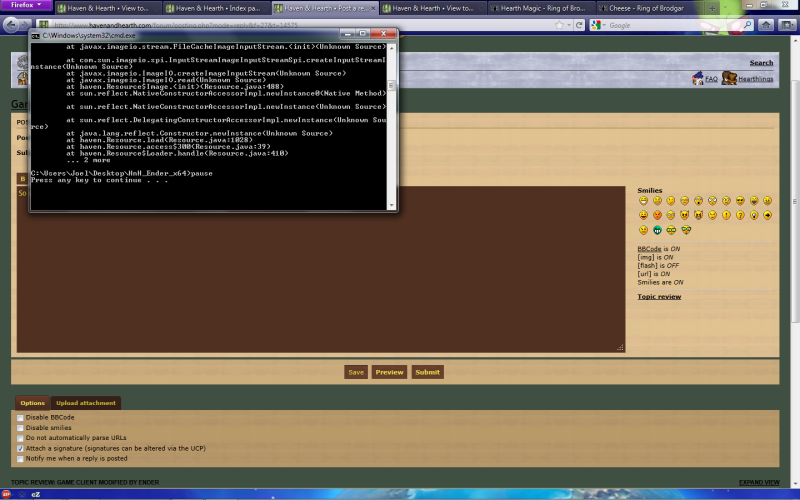
triacefan wrote:Hi, I got the "Windows cannot find javaw." error the first time I tried running it, so then I followed the solution by pasting the full directory path in the run.bat file. Now when I run it I get this error before the cmd closes down again.
Sorry if it's not clear, I tried doing a print screen but I can't get it to show any clearer than this.
This is what's inside my run.bat:Code: Select all
.\updater\HnH_updater.exe
"C:\Program Files (x86)\Java\jre6\bin\java.exe" start javaw -Xms256m -Xmx512m -jar haven.jar moltke.seatribe.se -r ./res
I'm using Windows 7 Ultimate, 64-bit edition. Any help would be appreciated.

Your run.bat file is not correct. Remove the word 'START'.
-Diadems of Odditown
Odditown loves you no matter what.
Odditown loves you no matter what.
-
Phades
- Posts: 352
- Joined: Tue Jan 25, 2011 9:07 pm
Re: Game Client modified by Ender
Shaidarhun wrote:How can u run it?
Edit: moded the run.bat and typed the pause in the end to see what are the problem i will make a screenshot about it.
Edit2: Here is the picture
[img]...[img]
Nice isn't it???
run.bat file:
"C:\Program Files (x86)\Java\jre6\bin\java.exe" -Xms256m -Xmx512m -jar haven.jar moltke.seatribe.se -r ./res
pause

I already added this to the first page of the ender thread...here is your solution:
Error contains: "java.lang.UnsatisfiedLinkError: no jogl..." or "...jogl.dll: Can't find dependent libraries"
Add: -Djava.library.path="PATH TO GAME FOLDER" to your run.bat.
Example:
Code: Select all
"C:\Program Files (x86)\Java\jre6\bin\java.exe" -Djava.library.path="C:\games\HnH\" -Xms256m -Xmx512m -jar haven.jar moltke.seatribe.se-Diadems of Odditown
Odditown loves you no matter what.
Odditown loves you no matter what.
-
Phades
- Posts: 352
- Joined: Tue Jan 25, 2011 9:07 pm
Re: Game Client modified by Ender
melkor wrote:It´s: .C:\Users\*****\Documents\Updater
start javaw -Xms256m -Xmx512m -jar haven.jar moltke.seatribe.se -r ./res
Change your run.bat to the following:
Code: Select all
"C:\Program Files (x86)\Java\jre6\bin\java.exe" -Xms256m -Xmx512m -jar haven.jar moltke.seatribe.se-Diadems of Odditown
Odditown loves you no matter what.
Odditown loves you no matter what.
-
Shaidarhun
- Posts: 8
- Joined: Sun Aug 28, 2011 12:00 pm
Re: Game Client modified by Ender
Phades wrote:I already added this to the first page of the ender thread...here is your solution:
Error contains: "java.lang.UnsatisfiedLinkError: no jogl..." or "...jogl.dll: Can't find dependent libraries"
Add: -Djava.library.path="PATH TO GAME FOLDER" to your run.bat.
Example:Code: Select all
"C:\Program Files (x86)\Java\jre6\bin\java.exe" -Djava.library.path="C:\games\HnH\" -Xms256m -Xmx512m -jar haven.jar moltke.seatribe.se
I copied over the enders client to c:/games\HnH\ and changed the run.bat now it says:
C:\Games\HnH>"C:\Program Files (x86)\Java\jre6\bin\java.exe" -Djava.library.path
="C:\games\HnH\" -Xms256m -Xmx512m -jar haven.jar moltke.seatribe.se
Usage: java [-options] class [args...]
(to execute a class)
or java [-options] -jar jarfile [args...]
(to execute a jar file)
where options include:
-client to select the "client" VM
-server to select the "server" VM
-hotspot is a synonym for the "client" VM [deprecated]
The default VM is client.
-cp <class search path of directories and zip/jar files>
-classpath <class search path of directories and zip/jar files>
A ; separated list of directories, JAR archives,
and ZIP archives to search for class files.
-D<name>=<value>
set a system property
-verbose[:class|gc|jni]
enable verbose output
-version print product version and exit
-version:<value>
require the specified version to run
-showversion print product version and continue
-jre-restrict-search | -jre-no-restrict-search
include/exclude user private JREs in the version search
-? -help print this help message
-X print help on non-standard options
-ea[:<packagename>...|:<classname>]
-enableassertions[:<packagename>...|:<classname>]
enable assertions
-da[:<packagename>...|:<classname>]
-disableassertions[:<packagename>...|:<classname>]
disable assertions
-esa | -enablesystemassertions
enable system assertions
-dsa | -disablesystemassertions
disable system assertions
-agentlib:<libname>[=<options>]
load native agent library <libname>, e.g. -agentlib:hprof
see also, -agentlib:jdwp=help and -agentlib:hprof=help
-agentpath:<pathname>[=<options>]
load native agent library by full pathname
-javaagent:<jarpath>[=<options>]
load Java programming language agent, see java.lang.instrument
-splash:<imagepath>
show splash screen with specified image
C:\Games\HnH>pause
-
Phades
- Posts: 352
- Joined: Tue Jan 25, 2011 9:07 pm
Re: Game Client modified by Ender
Shaidarhun wrote:Phades wrote:I already added this to the first page of the ender thread...here is your solution:
Error contains: "java.lang.UnsatisfiedLinkError: no jogl..." or "...jogl.dll: Can't find dependent libraries"
Add: -Djava.library.path="PATH TO GAME FOLDER" to your run.bat.
Example:Code: Select all
"C:\Program Files (x86)\Java\jre6\bin\java.exe" -Djava.library.path="C:\games\HnH\" -Xms256m -Xmx512m -jar haven.jar moltke.seatribe.se
I copied over the enders client to c:/games\HnH\ and changed the run.bat now it says:
"..edited.."
Make sure if you have pause in the run.bat that it is on a separate line (press enter).
The code in the example needs to be all on 1 line. It looks like yours might be on 2.
Try remove the trailing slash in "..\HnH\" Also, don't use a root folder as in the example--your system setup may not permit it--try using a folder in program files folder such as:
"C:\Program Files (x86)\HnH"
Lastly, go to http://www.java.com and make sure you have the latest version of java.
One last note: Make sure you are using the correct version of the client. If all the above fails to run it successfully, then do the above while trying the other version of Enders (32bit vs 64bit or vice-versa).
-Diadems of Odditown
Odditown loves you no matter what.
Odditown loves you no matter what.
-
Shaidarhun
- Posts: 8
- Joined: Sun Aug 28, 2011 12:00 pm
Re: Game Client modified by Ender
Phades wrote:
Make sure if you have pause in the run.bat that it is on a separate line (press enter).
The code in the example needs to be all on 1 line. It looks like yours might be on 2.
Try remove the trailing slash in "..\HnH\" Also, don't use a root folder as in the example--your system setup may not permit it--try using a folder in program files folder such as:
"C:\Program Files (x86)\HnH"
Lastly, go to http://www.java.com and make sure you have the latest version of java.
One last note: Make sure you are using the correct version of the client. If all the above fails to run it successfully, then do the above while trying the other version of Enders (32bit vs 64bit or vice-versa).
The trailing slash remove made the other error. Code is on 1 line and separated the pause still the same error. I have windows 7 64bit and downloaded the 64bit edition. Should i download the update for the client from mediafile?
Java is up to date...
I supposed to start the client with the run.bat, isn't it? I tried the haven-res but the windows says : Failed to load main-class manifest attribute from C:\games\HnH\haven-res.jar
I downloaded the update rar copied over and still the same message

-
melkor
- Posts: 19
- Joined: Mon Aug 01, 2011 7:56 am
Re: Game Client modified by Ender
No it´s doesnt work... Do you know Vista is odd so is code right? 
-
triacefan
- Posts: 4
- Joined: Sun Aug 28, 2011 10:24 pm
Re: Game Client modified by Ender
Phades wrote:triacefan wrote:Hi, I got the "Windows cannot find javaw." error the first time I tried running it, so then I followed the solution by pasting the full directory path in the run.bat file. Now when I run it I get this error before the cmd closes down again.
[IMAGE]
Sorry if it's not clear, I tried doing a print screen but I can't get it to show any clearer than this.
This is what's inside my run.bat:Code: Select all
.\updater\HnH_updater.exe
"C:\Program Files (x86)\Java\jre6\bin\java.exe" start javaw -Xms256m -Xmx512m -jar haven.jar moltke.seatribe.se -r ./res
I'm using Windows 7 Ultimate, 64-bit edition. Any help would be appreciated.
Your run.bat file is not correct. Remove the word 'START'.
Thanks for the reply Phades, I did as you suggested and removed start from run.bat. I also removed that entire first line, since I realized I haven't installed the updater. But I'm getting still getting an error message:

By the way, this is what my run.bat looks like now:

-
Reyouka
- Posts: 1
- Joined: Tue Aug 30, 2011 8:49 pm
Re: Game Client modified by Ender
So uh, need some help. It isn't giving me a error far as I know, but HnH just won't start when using this client.
.\updater\HnH_updater.exe
"C:\Program Files (x86)\Java\jre6\bin\java.exe" -Xms256m -Xmx512m -jar haven.jar moltke.seatribe.se
pause
.\updater\HnH_updater.exe
"C:\Program Files (x86)\Java\jre6\bin\java.exe" -Xms256m -Xmx512m -jar haven.jar moltke.seatribe.se
pause
