min_the_fair wrote:You may have put the -d32 option in the wrong place.
No, when I ran your run.command without doing anything to it, Terminal told me that -d32 was an unrecognised command. This is probably something to do with me having an old computer? I dunno, if my brother ever stops mocking me he might just get round to setting up his old PC for me. EWWW. It's a desktop. Where am I going to find the space for a desk?!!1!
There is a new version. Download that version and open run.command. Let me know if you get any errors.
Also, make sure you have the most recent version of Java.
-Diadems of Odditown
Odditown loves you no matter what.
I'm still having issues getting this to run.
1 of 3 things is happening.
1. i run, run.command, and it tells me it can't find the directory i'm telling it to switch to. (despite this being the correct path, (and not giveing me any issues if i use a terminal to do the CD command,so i know the path is correct).
2. telling me that it can't find the haven.jar for similar reasons.
3. I tried just running the java command straight from a terminal, it got the game to launch but when i log in, just takes me to a black screen.
I've got the latest version of java installed (1.6.024) and i'm running 10.6.6
I posted this in the Troubleshooting thread, but I'll post it again in here.
I installed the custom version of the client and it throws up this error (although I'm having to run it with x64 Java since my Macbook only has the x64 version updated to 1.6, it throws up the same error on every custom version of H&H I try to use so it's not an issue with that);
Terminal Quote wrote:Last login: Sat Mar 19 15:34:44 on ttys000
fraser-millss-macbook:~ Fredulom$ /Users/Fredulom/Desktop/enderMac32/run.command ; exit;
2011-03-19 15:41:06.053 java[472:c0b] *** Assertion failure in -[CocoaAppWindow _changeJustMain], /SourceCache/AppKit/AppKit-949.54/AppKit.subproj/NSWindow.m:8598
2011-03-19 15:41:06.055 java[472:c0b] *** CPerformer: ignoring exception 'Invalid parameter not satisfying: [self canBecomeMainWindow]' raised during perform of selector 'requestFocus:' on target 'FocusManager' with args '<AWTComponentSetFocusData: 0x11fc03e00>'
Exception in thread "AWT-EventQueue-0" java.lang.ExceptionInInitializerError
at com.sun.opengl.impl.JAWT.size(JAWT.java:17)
at com.sun.opengl.impl.JAWT.create(JAWT.java:25)
at com.sun.opengl.impl.JAWT$1.run(JAWT.java:97)
at java.security.AccessController.doPrivileged(Native Method)
at com.sun.opengl.impl.JAWT.getJAWT(JAWT.java:95)
at com.sun.opengl.impl.macosx.MacOSXOnscreenGLDrawable.lockSurface(MacOSXOnscreenGLDrawable.java:144)
at com.sun.opengl.impl.macosx.MacOSXOnscreenGLContext.makeCurrentImpl(MacOSXOnscreenGLContext.java:57)
at com.sun.opengl.impl.GLContextImpl.makeCurrent(GLContextImpl.java:134)
at com.sun.opengl.impl.GLDrawableHelper.invokeGL(GLDrawableHelper.java:182)
at javax.media.opengl.GLCanvas.maybeDoSingleThreadedWorkaround(GLCanvas.java:412)
at javax.media.opengl.GLCanvas.display(GLCanvas.java:244)
at javax.media.opengl.GLCanvas.paint(GLCanvas.java:277)
at sun.awt.RepaintArea.paintComponent(RepaintArea.java:276)
at sun.awt.RepaintArea.paint(RepaintArea.java:241)
at apple.awt.ComponentModel.handleEvent(ComponentModel.java:263)
at java.awt.Component.dispatchEventImpl(Component.java:4812)
at java.awt.Component.dispatchEvent(Component.java:4566)
at java.awt.EventQueue.dispatchEventImpl(EventQueue.java:680)
at java.awt.EventQueue.access$000(EventQueue.java:86)
at java.awt.EventQueue$1.run(EventQueue.java:639)
at java.awt.EventQueue$1.run(EventQueue.java:637)
at java.security.AccessController.doPrivileged(Native Method)
at java.security.AccessControlContext$1.doIntersectionPrivilege(AccessControlContext.java:87)
at java.security.AccessControlContext$1.doIntersectionPrivilege(AccessControlContext.java:98)
at java.awt.EventQueue$2.run(EventQueue.java:653)
at java.awt.EventQueue$2.run(EventQueue.java:651)
at java.security.AccessController.doPrivileged(Native Method)
at java.security.AccessControlContext$1.doIntersectionPrivilege(AccessControlContext.java:87)
at java.awt.EventQueue.dispatchEvent(EventQueue.java:650)
at java.awt.EventDispatchThread.pumpOneEventForFilters(EventDispatchThread.java:296)
at java.awt.EventDispatchThread.pumpEventsForFilter(EventDispatchThread.java:211)
at java.awt.EventDispatchThread.pumpEventsForHierarchy(EventDispatchThread.java:201)
at java.awt.EventDispatchThread.pumpEvents(EventDispatchThread.java:196)
at java.awt.EventDispatchThread.pumpEvents(EventDispatchThread.java:188)
at java.awt.EventDispatchThread.run(EventDispatchThread.java:122)
Caused by: java.lang.RuntimeException: Please port CPU detection (32/64 bit) to your platform (mac os x/x86_64)
at com.sun.gluegen.runtime.CPU.<clinit>(CPU.java:72)
... 35 more
javax.media.opengl.GLException: javax.media.opengl.GLException: Attempt to make the same context current twice on thread Thread[AWT-EventQueue-0,6,main]
at javax.media.opengl.Threading.invokeOnOpenGLThread(Threading.java:271)
at javax.media.opengl.GLCanvas.maybeDoSingleThreadedWorkaround(GLCanvas.java:410)
at javax.media.opengl.GLCanvas.display(GLCanvas.java:244)
at haven.HavenPanel.uglyjoglhack(HavenPanel.java:349)
at haven.HavenPanel.run(HavenPanel.java:378)
at java.lang.Thread.run(Thread.java:680)
Caused by: javax.media.opengl.GLException: Attempt to make the same context current twice on thread Thread[AWT-EventQueue-0,6,main]
at com.sun.opengl.impl.GLContextLock.lock(GLContextLock.java:83)
at com.sun.opengl.impl.GLContextImpl.makeCurrent(GLContextImpl.java:131)
at com.sun.opengl.impl.GLDrawableHelper.invokeGL(GLDrawableHelper.java:182)
at javax.media.opengl.GLCanvas$DisplayOnEventDispatchThreadAction.run(GLCanvas.java:452)
at java.awt.event.InvocationEvent.dispatch(InvocationEvent.java:199)
at java.awt.EventQueue.dispatchEventImpl(EventQueue.java:678)
at java.awt.EventQueue.access$000(EventQueue.java:86)
at java.awt.EventQueue$1.run(EventQueue.java:639)
at java.awt.EventQueue$1.run(EventQueue.java:637)
at java.security.AccessController.doPrivileged(Native Method)
at java.security.AccessControlContext$1.doIntersectionPrivilege(AccessControlContext.java:87)
at java.awt.EventQueue.dispatchEvent(EventQueue.java:648)
at java.awt.EventDispatchThread.pumpOneEventForFilters(EventDispatchThread.java:296)
at java.awt.EventDispatchThread.pumpEventsForFilter(EventDispatchThread.java:211)
at java.awt.EventDispatchThread.pumpEventsForHierarchy(EventDispatchThread.java:201)
at java.awt.EventDispatchThread.pumpEvents(EventDispatchThread.java:196)
at java.awt.EventDispatchThread.pumpEvents(EventDispatchThread.java:188)
at java.awt.EventDispatchThread.run(EventDispatchThread.java:122)
Exception in thread "Haven UI thread" javax.media.opengl.GLException: javax.media.opengl.GLException: Attempt to make the same context current twice on thread Thread[AWT-EventQueue-0,6,main]
at javax.media.opengl.Threading.invokeOnOpenGLThread(Threading.java:271)
at javax.media.opengl.GLCanvas.maybeDoSingleThreadedWorkaround(GLCanvas.java:410)
at javax.media.opengl.GLCanvas.display(GLCanvas.java:244)
at haven.HavenPanel.uglyjoglhack(HavenPanel.java:349)
at haven.HavenPanel.run(HavenPanel.java:378)
at java.lang.Thread.run(Thread.java:680)
Caused by: javax.media.opengl.GLException: Attempt to make the same context current twice on thread Thread[AWT-EventQueue-0,6,main]
at com.sun.opengl.impl.GLContextLock.lock(GLContextLock.java:83)
at com.sun.opengl.impl.GLContextImpl.makeCurrent(GLContextImpl.java:131)
at com.sun.opengl.impl.GLDrawableHelper.invokeGL(GLDrawableHelper.java:182)
at javax.media.opengl.GLCanvas$DisplayOnEventDispatchThreadAction.run(GLCanvas.java:452)
at java.awt.event.InvocationEvent.dispatch(InvocationEvent.java:199)
at java.awt.EventQueue.dispatchEventImpl(EventQueue.java:678)
at java.awt.EventQueue.access$000(EventQueue.java:86)
at java.awt.EventQueue$1.run(EventQueue.java:639)
at java.awt.EventQueue$1.run(EventQueue.java:637)
at java.security.AccessController.doPrivileged(Native Method)
at java.security.AccessControlContext$1.doIntersectionPrivilege(AccessControlContext.java:87)
at java.awt.EventQueue.dispatchEvent(EventQueue.java:648)
at java.awt.EventDispatchThread.pumpOneEventForFilters(EventDispatchThread.java:296)
at java.awt.EventDispatchThread.pumpEventsForFilter(EventDispatchThread.java:211)
at java.awt.EventDispatchThread.pumpEventsForHierarchy(EventDispatchThread.java:201)
at java.awt.EventDispatchThread.pumpEvents(EventDispatchThread.java:196)
at java.awt.EventDispatchThread.pumpEvents(EventDispatchThread.java:188)
at java.awt.EventDispatchThread.run(EventDispatchThread.java:122)
Exception in thread "AWT-EventQueue-0" javax.media.opengl.GLException: Attempt to make the same context current twice on thread Thread[AWT-EventQueue-0,6,main]
at com.sun.opengl.impl.GLContextLock.lock(GLContextLock.java:83)
at com.sun.opengl.impl.GLContextImpl.makeCurrent(GLContextImpl.java:131)
at com.sun.opengl.impl.GLDrawableHelper.invokeGL(GLDrawableHelper.java:182)
at javax.media.opengl.GLCanvas.maybeDoSingleThreadedWorkaround(GLCanvas.java:412)
at javax.media.opengl.GLCanvas.display(GLCanvas.java:244)
at javax.media.opengl.GLCanvas.paint(GLCanvas.java:277)
at sun.awt.RepaintArea.paintComponent(RepaintArea.java:276)
at sun.awt.RepaintArea.paint(RepaintArea.java:241)
at apple.awt.ComponentModel.handleEvent(ComponentModel.java:263)
at java.awt.Component.dispatchEventImpl(Component.java:4812)
at java.awt.Component.dispatchEvent(Component.java:4566)
at java.awt.EventQueue.dispatchEventImpl(EventQueue.java:680)
at java.awt.EventQueue.access$000(EventQueue.java:86)
at java.awt.EventQueue$1.run(EventQueue.java:639)
at java.awt.EventQueue$1.run(EventQueue.java:637)
at java.security.AccessController.doPrivileged(Native Method)
at java.security.AccessControlContext$1.doIntersectionPrivilege(AccessControlContext.java:87)
at java.security.AccessControlContext$1.doIntersectionPrivilege(AccessControlContext.java:98)
at java.awt.EventQueue$2.run(EventQueue.java:653)
at java.awt.EventQueue$2.run(EventQueue.java:651)
at java.security.AccessController.doPrivileged(Native Method)
at java.security.AccessControlContext$1.doIntersectionPrivilege(AccessControlContext.java:87)
at java.awt.EventQueue.dispatchEvent(EventQueue.java:650)
at java.awt.EventDispatchThread.pumpOneEventForFilters(EventDispatchThread.java:296)
at java.awt.EventDispatchThread.pumpEventsForFilter(EventDispatchThread.java:211)
at java.awt.EventDispatchThread.pumpEventsForHierarchy(EventDispatchThread.java:201)
at java.awt.EventDispatchThread.pumpEvents(EventDispatchThread.java:196)
at java.awt.EventDispatchThread.pumpEvents(EventDispatchThread.java:188)
at java.awt.EventDispatchThread.run(EventDispatchThread.java:122)
Any chance that you could help me out?
Fredulom
+[[ Fredulom, Chieftain of Alpacastan ]]-
Guess what religion we practice in Alpacastan? Isllama.
Fredulom wrote:I posted this in the Troubleshooting thread, but I'll post it again in here.
I installed the custom version of the client and it throws up this error (although I'm having to run it with x64 Java since my Macbook only has the x64 version updated to 1.6, it throws up the same error on every custom version of H&H I try to use so it's not an issue with that);
You have to set your java to use 32bit mode first. It's in Apps>Utilities>JavaPrefs.
(If you don't have a 32bit version of java then find one and install it I guess?)
malkvn wrote:I'm still having issues getting this to run.
1 of 3 things is happening.
1. i run, run.command, and it tells me it can't find the directory i'm telling it to switch to. (despite this being the correct path, (and not giveing me any issues if i use a terminal to do the CD command,so i know the path is correct).
2. telling me that it can't find the haven.jar for similar reasons.
3. I tried just running the java command straight from a terminal, it got the game to launch but when i log in, just takes me to a black screen.
I've got the latest version of java installed (1.6.024) and i'm running 10.6.6
malkvn, check your pms
-Diadems of Odditown
Odditown loves you no matter what.
Fredulom wrote:I posted this in the Troubleshooting thread, but I'll post it again in here.
I installed the custom version of the client and it throws up this error (although I'm having to run it with x64 Java since my Macbook only has the x64 version updated to 1.6, it throws up the same error on every custom version of H&H I try to use so it's not an issue with that);
You have to set your java to use 32bit mode first. It's in Apps>Utilities>JavaPrefs.
(If you don't have a 32bit version of java then find one and install it I guess?)
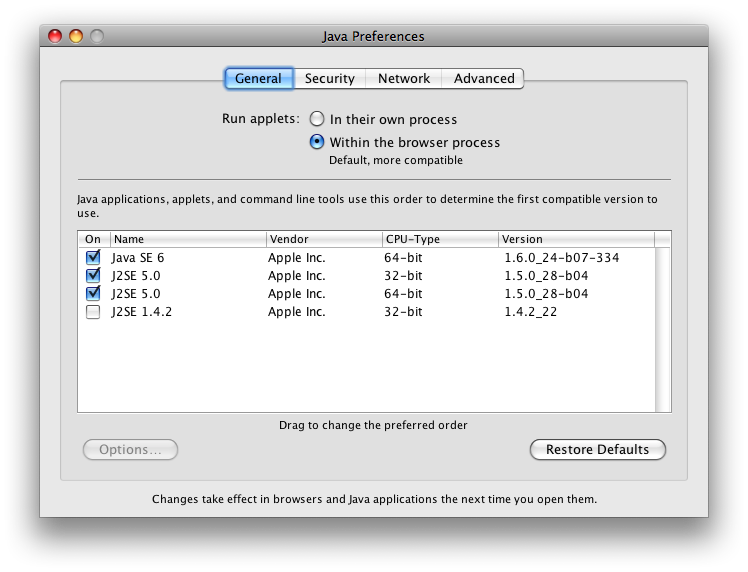
For some reason I can't install 32-bit Java 1.6, in the settings the only version of Java 1.6 I have is the 64-bit version... Look, I'll show you a picture
And I cannot install a different version of Java, Java updates and installations are handled by the Software Update application and as a result I can't get any other different versions... And I did say that this happens with other clients too, both x32 and x64 so I doubt it has something to do with the fact I have to run x64 Java.
Fredulom
+[[ Fredulom, Chieftain of Alpacastan ]]-
Guess what religion we practice in Alpacastan? Isllama.
I have never been able to get a client working on my mac.
I just downloaded Ando's working version.
I get this message.
Last login: Thu Mar 24 17:10:23 on ttyp1
/Users/Kelly/Desktop/enderMac32/run.command; exit
Welcome to Darwin!
kelly-belzs-computer:~ Kelly$ /Users/Kelly/Desktop/enderMac32/run.command; exit
Unrecognized option: -d32
Could not create the Java virtual machine.
logout
[Process completed]
I changed nothing in the run command. My Mac is older, Mac OS X 10.4.11
Like someone else said the java on my machine only updates on its own, I have two versions j2se 1.4.2 and j2se 5.0. It doesnt tell me what the bits are in the "general" tab it just asks we which one I want first on the list, I have moved both around.