borka wrote: -snip how to make and what exceptions-
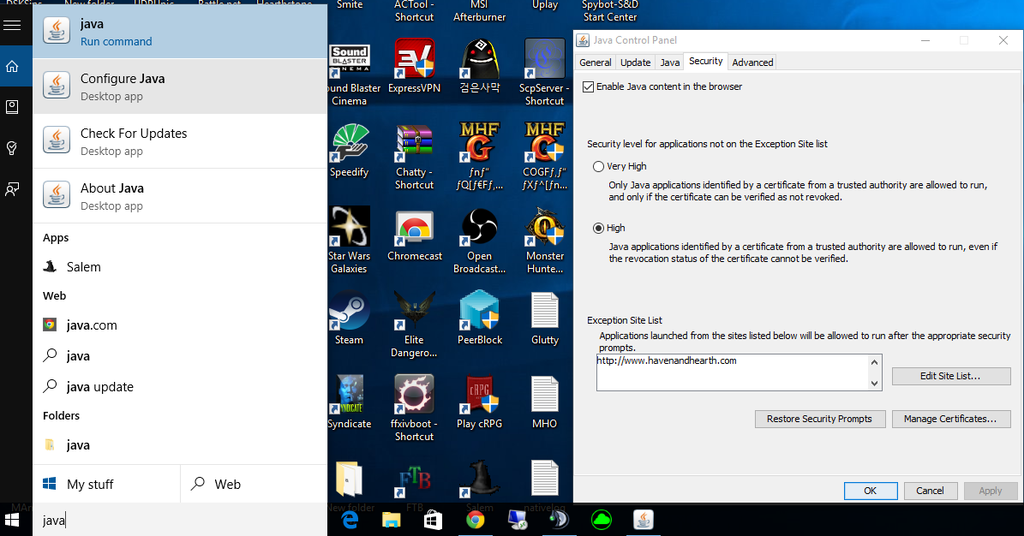
make sure "activate Java Content in Browser is checked (leave at disabled in browser settings itself)
right click to open enlarged in tab
click Play Button - choose "Open with Java Web Start Launcher" from dropdown menue
you need to check at the bottom here too
right click to open enlarged in tab
ty Arcanist for image
---------------------------------------------------------------------------------------------------------------
javacpl.exe (i.e. C:\Programme\Java\jreX\bin\javacpl.exe) = Java Control Panel
javaws.exe (i.e. C:\Programme\Java\jreX\bin\javaws.exe) =Java Web Start Launcher
-
borka

- Posts: 9965
- Joined: Thu Feb 03, 2011 7:47 pm
- Location: World of Sprucecap
Re: How to get autohaven(.jnlp) working Windows+Java Securit
it's all described in the first post of this thread :


Avatar by SacreDoom
Java 8 - manually downloads - good to check for actual versions url here:
viewtopic.php?f=42&t=40331
Remember what the dormouse said: Feed your head Feed your head
Java 8 - manually downloads - good to check for actual versions url here:
viewtopic.php?f=42&t=40331
Remember what the dormouse said: Feed your head Feed your head
-
borka
- Posts: 9965
- Joined: Thu Feb 03, 2011 7:47 pm
- Location: World of Sprucecap
Re: How to get autohaven(.jnlp) working Windows+Java Securit
Buuuuump
Avatar by SacreDoom
Java 8 - manually downloads - good to check for actual versions url here:
viewtopic.php?f=42&t=40331
Remember what the dormouse said: Feed your head Feed your head
Java 8 - manually downloads - good to check for actual versions url here:
viewtopic.php?f=42&t=40331
Remember what the dormouse said: Feed your head Feed your head
-
TheMapp

- Posts: 21
- Joined: Sat Jan 21, 2012 3:40 am
Re: How to get autohaven(.jnlp) working Windows+Java Securit
For windows 10 its a bit different opening Java Control Panel. Use the search box at the bottom and look up java. Select "Configure Java" and the control panel will open, add the haven and hearth address via the edit site list button.