LoL - tricked...Win7 Starter is 32 Bit only and "reduced" to the bone
Sorry to say but any tries to run any HnH custom client with that Intel netbook graphic chip are nearly worthless also only 1 gig of ram - guess you'd have to stay with default client or use a real PC...
Only suggestion as long you don't upgrade your netbook to 2GB (the maximum W7 Starter can handle) :
edit your run.bat:
"C:\Program Files\Java\jre7\bin\javaw.exe" -Xms128m -Xmx256m -jar haven.jar moltke.seatribe.se -r ./res
Custom Client Troubleshooting flowchart.
Moderator: Phades
-
borka

- Posts: 9965
- Joined: Thu Feb 03, 2011 7:47 pm
- Location: World of Sprucecap
Re: Custom Client Troubleshooting flowchart.
Avatar by SacreDoom
Java 8 - manually downloads - good to check for actual versions url here:
viewtopic.php?f=42&t=40331
Remember what the dormouse said: Feed your head Feed your head
Java 8 - manually downloads - good to check for actual versions url here:
viewtopic.php?f=42&t=40331
Remember what the dormouse said: Feed your head Feed your head
-
foomanchu
- Posts: 121
- Joined: Wed Jun 29, 2011 6:13 am
Re: Custom Client Troubleshooting flowchart.
my condolences on the computer 
did you try his 2nd suggestion of putting it in a temp folder and running it from there?
im still curious to see if he changes it to java.exe and it outputs an error
and dont give up.. i remember back when i was trying to get enders to work.. was very frustrating, but its definitely worth it!
did you try his 2nd suggestion of putting it in a temp folder and running it from there?
im still curious to see if he changes it to java.exe and it outputs an error
and dont give up.. i remember back when i was trying to get enders to work.. was very frustrating, but its definitely worth it!
-
borka
- Posts: 9965
- Joined: Thu Feb 03, 2011 7:47 pm
- Location: World of Sprucecap
Re: Custom Client Troubleshooting flowchart.
Not sure whether having a console associated would help much - i wonder if it would state: Not enough memory 
(think the console won't even show)
Changing the folder might help on a real Computer but not on that one - trust me i got loads of experience with those (including complete disassambly and "chip modding") ... only way might be changing min/max Heap memory size...but even then the Intel 945GSE Express is giving headaches...
(think the console won't even show)
Changing the folder might help on a real Computer but not on that one - trust me i got loads of experience with those (including complete disassambly and "chip modding") ... only way might be changing min/max Heap memory size...but even then the Intel 945GSE Express is giving headaches...
Avatar by SacreDoom
Java 8 - manually downloads - good to check for actual versions url here:
viewtopic.php?f=42&t=40331
Remember what the dormouse said: Feed your head Feed your head
Java 8 - manually downloads - good to check for actual versions url here:
viewtopic.php?f=42&t=40331
Remember what the dormouse said: Feed your head Feed your head
-
jag648
- Posts: 10
- Joined: Sun Oct 23, 2011 1:10 am
Re: Custom Client Troubleshooting flowchart.
Meh I knew from the start my computer would probably not run it but wanted to try. Anyway thanks for the help should have said my computer stats in the first place. Well as I said thanks for the help.
-
borka
- Posts: 9965
- Joined: Thu Feb 03, 2011 7:47 pm
- Location: World of Sprucecap
Re: Custom Client Troubleshooting flowchart.
did you try with edited run.bat ?
Pls do and report back
Code: Select all
"C:\Program Files\Java\jre7\bin\javaw.exe" -Xms128m -Xmx256m -jar haven.jar moltke.seatribe.se -r ./resPls do and report back
Avatar by SacreDoom
Java 8 - manually downloads - good to check for actual versions url here:
viewtopic.php?f=42&t=40331
Remember what the dormouse said: Feed your head Feed your head
Java 8 - manually downloads - good to check for actual versions url here:
viewtopic.php?f=42&t=40331
Remember what the dormouse said: Feed your head Feed your head
-
jag648
- Posts: 10
- Joined: Sun Oct 23, 2011 1:10 am
Re: Custom Client Troubleshooting flowchart.
Yes it didn't do anything I think I'll give up on getting the client on the my Win7shi-I mean starter laptop. My moms laptop runs the client with a little lag but if she is not using it I will be able to play on there.
-
AAlex

- Posts: 1377
- Joined: Wed Dec 15, 2010 2:27 pm

-
borka
- Posts: 9965
- Joined: Thu Feb 03, 2011 7:47 pm
- Location: World of Sprucecap
Re: Custom Client Troubleshooting flowchart.
OP url is dead since some time - i had it uploaded to puushme and posted - but puushme seems to be down too atm...
uploaded:
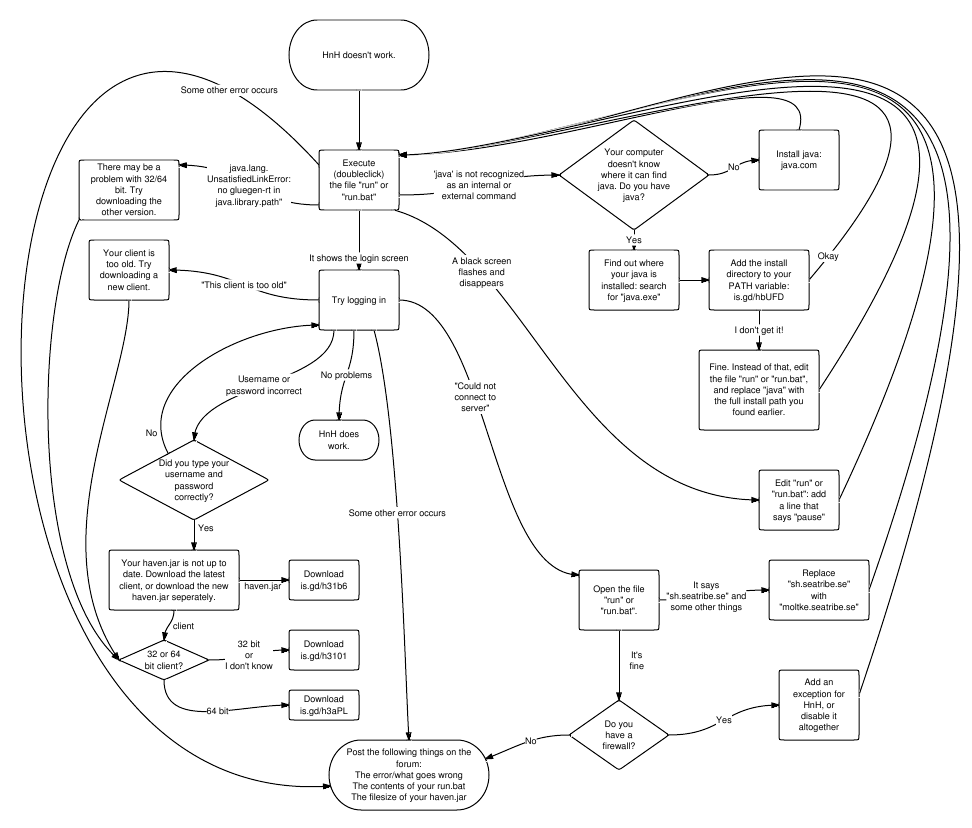
uploaded:
Avatar by SacreDoom
Java 8 - manually downloads - good to check for actual versions url here:
viewtopic.php?f=42&t=40331
Remember what the dormouse said: Feed your head Feed your head
Java 8 - manually downloads - good to check for actual versions url here:
viewtopic.php?f=42&t=40331
Remember what the dormouse said: Feed your head Feed your head
-
Cranny
- Posts: 400
- Joined: Fri Mar 02, 2012 1:55 am
Re: Custom Client Troubleshooting flowchart.
I just did this with this very old pc Im using and it is working a little better.borka wrote:LoL - tricked...
edit your run.bat:
"C:\Program Files\Java\jre7\bin\javaw.exe" -Xms128m -Xmx256m -jar haven.jar moltke.seatribe.se -r ./res

Thx currently trying everything I see might help.
-
AAlex
- Posts: 1377
- Joined: Wed Dec 15, 2010 2:27 pm
