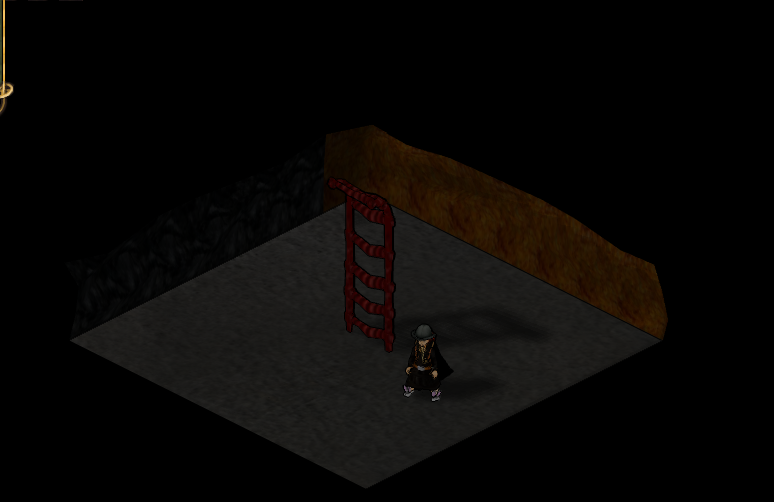
Screenshots of World 9

General discussion and socializing.
User avatar
gradu
Posts: 21
Joined: Sun Jun 26, 2011 6:37 am

Re: Screenshots of World 9

Post by gradu »

The Black Tower! :D

Image
User avatar
Amanda44
Posts: 6485
Joined: Wed Sep 28, 2011 12:13 pm

Re: Screenshots of World 9

Post by Amanda44 »

ravenguard19 wrote:
Amanda44 wrote:I tried to take a lovely shot of my favourite animal but they are just too fast ... :(
Image
Does anyone know if there is any way to cure the blurriness my screenshots and game appearance now suffer from since the multitexturing update?
It's so disheartening. :(

Try maxing anisotropic filtering and enabling antialiasing. If this didn't work try to check if your graphic card's drivers are ok.
Hey, thanks, it may have made a slight difference, I'm not sure, lol. Maybe it needs a restart now?
Graphics card is a good one, I'm not sure how to tell if the drivers are ok and have no-one here to ask atm, but it was fine before update and working fine on all other games, like no change, so I assume they are working properly.
Koru wrote:
It is like in Lord of the Flies, nobody controlls what is going on in the hearthlands, those weaker and with conscience are just fucked.
Avatar made by Jordan.
Animal lovers - Show us your pets! - viewtopic.php?f=40&t=44444#p577254
User avatar
ravenguard19
Posts: 1300
Joined: Thu Jan 13, 2011 7:49 pm

Re: Screenshots of World 9

Post by ravenguard19 »

You should change everything to "controlled by application" (if there's that option) in your graphic cards control panel. You can also check this site, it has some cool tricks for maximizing graphics quality http://www.pcworld.com/article/191684/t ... aming.html
Image

Because we can and we will.... die!
User avatar
Amanda44
Posts: 6485
Joined: Wed Sep 28, 2011 12:13 pm

Re: Screenshots of World 9

Post by Amanda44 »

ravenguard19 wrote:You should change everything to "controlled by application" (if there's that option) in your graphic cards control panel. You can also check this site, it has some cool tricks for maximizing graphics quality http://www.pcworld.com/article/191684/t ... aming.html
Kk, thanks, I'll go and read up on it now and change the option in the control panel. Fingers crossed. :D

P.s. I found the bit that says if they are working properly and they are, lol, so that's that bit sorted.
Koru wrote:
It is like in Lord of the Flies, nobody controlls what is going on in the hearthlands, those weaker and with conscience are just fucked.
Avatar made by Jordan.
Animal lovers - Show us your pets! - viewtopic.php?f=40&t=44444#p577254
User avatar
xTrainx
Posts: 515
Joined: Sun Feb 02, 2014 8:22 am
Location: Venezuela

Re: Screenshots of World 9

Post by xTrainx »

gradu wrote:The Black Tower! :D

Image
how many gold coins does it get for wellfare?
User avatar
Jalpha
Under curfew
Posts: 1841
Joined: Thu Aug 22, 2013 12:16 pm

Re: Screenshots of World 9

Post by Jalpha »

You're doing silk in a tower?

That many staircases would drive me nuts.
Laying flat.
User avatar
Astarisk
Posts: 882
Joined: Fri Aug 13, 2010 7:08 am

Re: Screenshots of World 9

Post by Astarisk »

Image
IRC/IGN: Rawrz

Join the (HedgeHugs) Haven & Hearth Discord if you need help.
https://discord.com/invite/Uy8yzm4
User avatar
caasi117
Posts: 125
Joined: Fri Aug 15, 2014 4:53 am
Location: Australia mate

Re: Screenshots of World 9

Post by caasi117 »

Image
Perfect!!
User avatar
NOOBY93
Posts: 6528
Joined: Tue Aug 09, 2011 1:12 pm

Re: Screenshots of World 9

Post by NOOBY93 »

Image

What are you gonna do about it?
Jalpha wrote:I believe in my interpretation of things.
User avatar
Ag_Revol
Posts: 286
Joined: Thu Feb 18, 2016 8:51 pm

Re: Screenshots of World 9

Post by Ag_Revol »

When you mine too much
Image
Make Kebabs Great Again!
W6-8 - Hermit
W9 - Amish Paradise
W10 - Amish Paradise then Hermit
W11 - A.D.
W12 - Lawspeaker of Avalon
W13 - Konung of Norsca
W14 - Konung of Norsca

Return to “The Inn of Brodgar”