Daji's Graphic mod V.1.00
Moderator: Phades
-
Daji

- Posts: 321
- Joined: Tue Jan 18, 2011 9:32 pm
- Location: I'm a wizard!
-
RJT

- Posts: 1186
- Joined: Sun Jan 30, 2011 11:14 pm
Re: Daji's Graphic mod V.1.00

My sheep learned how to climb trees.
I actually do like your graphics a lot just that is really funny.
[8:21:56 PM] Ravian: We didn't run
[8:22:04 PM] Ravian: We left in the other direction
http://strawpoll.me/6822558
Stand against tyranny, Brothers and sisters. Rise!
[8:22:04 PM] Ravian: We left in the other direction
http://strawpoll.me/6822558
Stand against tyranny, Brothers and sisters. Rise!
-
Timothy123

- Posts: 260
- Joined: Fri Dec 21, 2012 10:18 pm
- Location: Nova Scotia, Canada
Re: Daji Graphic mod - File on 1st page
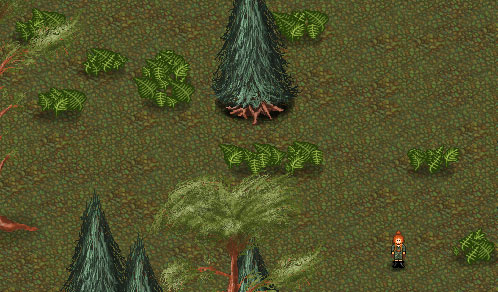
Umm could I just have the file for ferns cause I don't want to erase the other mods I gotDaji wrote:and now.. something completly different!
New ferns in next update

"To fear death is to fear the beginning of a new book in a series of many."
-
mvgulik
- Posts: 4090
- Joined: Fri May 21, 2010 2:29 am
Re: Daji's Graphic mod V.1.00
- Download Daji mod file.
- Unpack Daji mod file.
- Ditch everything except the "res\gfx\terobjs\trees" folder.
- pick out the tree's your after.
- Unpack Daji mod file.
- Ditch everything except the "res\gfx\terobjs\trees" folder.
- pick out the tree's your after.
-
Fatness
- Posts: 6
- Joined: Tue Aug 20, 2013 10:30 pm
- Location: Fatland
Re: Daji's Graphic mod V.1.00
The Fox Reskin Looks Original Wen The Fox Runs 


-
dagrimreefah

- Posts: 2648
- Joined: Wed May 25, 2011 3:01 am
Re: Daji's Graphic mod V.1.00
Thanks for that illuminating insight that no one else was aware of.Fatness wrote:The Fox Reskin Looks Original Wen The Fox Runs
-
Timothy123
- Posts: 260
- Joined: Fri Dec 21, 2012 10:18 pm
- Location: Nova Scotia, Canada
Re: Daji's Graphic mod V.1.00
I did so i deleted my whole terobjs and put the newer one in and still no ferns and I don't know why.mvgulik wrote:- Download Daji mod file.
- Unpack Daji mod file.
- Ditch everything except the "res\gfx\terobjs\trees" folder.
- pick out the tree's your after.
"To fear death is to fear the beginning of a new book in a series of many."
-
borka

- Posts: 9965
- Joined: Thu Feb 03, 2011 7:47 pm
- Location: World of Sprucecap
Re: Daji's Graphic mod V.1.00
Hide bushes enabled?
Avatar by SacreDoom
Java 8 - manually downloads - good to check for actual versions url here:
viewtopic.php?f=42&t=40331
Remember what the dormouse said: Feed your head Feed your head
Java 8 - manually downloads - good to check for actual versions url here:
viewtopic.php?f=42&t=40331
Remember what the dormouse said: Feed your head Feed your head
-
Timothy123
- Posts: 260
- Joined: Fri Dec 21, 2012 10:18 pm
- Location: Nova Scotia, Canada
Re: Daji's Graphic mod V.1.00
Yes but even when I un-hide them it shows up as the old/original bushesborka wrote:Hide bushes enabled?
"To fear death is to fear the beginning of a new book in a series of many."
-
mvgulik
- Posts: 4090
- Joined: Fri May 21, 2010 2:29 am
Re: Daji's Graphic mod V.1.00
Mmm. Not much to go on on what might be wrong here. If the modded res files/image don't show up in the game, the only logical first conclusion is that they are not in there right place (wrong path/location).Timothy123 wrote:I did so i deleted my whole terobjs and put the newer one in and still no ferns and I don't know why.mvgulik wrote:- Download Daji mod file.
- Unpack Daji mod file.
- Ditch everything except the "res\gfx\terobjs\trees" folder.
- pick out the tree's your after.
Location of tree files should be:
<Client Root>\custom_res\gfx\terobjs\trees\<elm|atree|birch|etc>\(actual tree related res files)
Note: Although Daji's did all tree's at there final level(6), not all levels of all tree's where modded. So some original tree's will/can show up.
