Ender Client

Forum for alternative clients, mods & discussions on the same.
meus
Posts: 212
Joined: Sun Sep 04, 2011 3:00 pm

Re: Ender Client

Post by meus »

How do the timers work?

I am trying to set up a short timer - 1 minute.
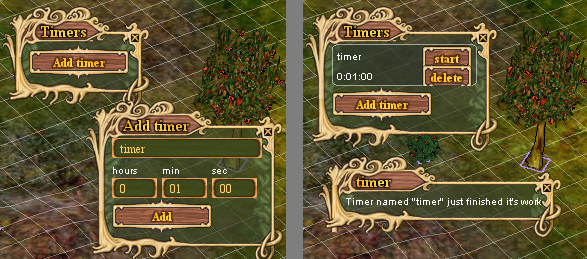
After creating the timer, I immediately start it, and it immediately displays a message that it's already over:
Image

Do I have to enter a specific time (like an alarm - e.g. 10:30), or do I have to input a countdown period?

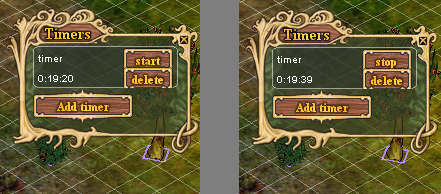
Sometimes even the time displayed in the timer is changed (just after I start it) - in this case, 19:20 -> 19:39 :
Image
mvgulik
Posts: 4090
Joined: Fri May 21, 2010 2:29 am

Re: Ender Client

Post by mvgulik »

The timers use game-clock update events to check if a timer has expired. (they are countdown timers btw)
One problem here is that the game clock in general only updates somewhat randomly every ~1.5 to ~2.0 (or even longer) real minutes.
Problem 2 is that the "timers" window needs to be open for the timers to work (ie: triggering alarms).

(Short timers of around ~1 minute generally expire immediately)

Personally I would just search for an external timer until. Mainly because those also work when you don't have the/any client open (+potential more & better options. Like alarm sounds).
Last edited by mvgulik on Fri Mar 26, 2021 12:31 am, edited 2 times in total.
stiffhorns
Posts: 12
Joined: Sat May 05, 2018 12:51 pm

Re: Ender Client

Post by stiffhorns »

I can't log onto the server using Ender, on the login screen it wont log me in once I input my info. Is there something I'm missing?

I can log into the server just fine using the main client on the home page.
User avatar
MagicManICT
Posts: 18435
Joined: Tue Aug 17, 2010 1:47 am

Re: Ender Client

Post by MagicManICT »

stiffhorns wrote:I can't log onto the server using Ender, on the login screen it wont log me in once I input my info. Is there something I'm missing?

I can log into the server just fine using the main client on the home page.
When suddenly having new issues with custom clients, always look for new threads in Announcements. There has been a change to account authentication that may require Ender to push some code changes through before being able to use the client.
Opinions expressed in this statement are the authors alone and in no way reflect on the game development values of the actual developers.
User avatar
Robertzon
Posts: 1483
Joined: Mon Jan 03, 2011 11:51 pm

Re: Ender Client

Post by Robertzon »

stiffhorns wrote:I can't log onto the server using Ender, on the login screen it wont log me in once I input my info. Is there something I'm missing?

I can log into the server just fine using the main client on the home page.
run updater-hafen in folder
User avatar
delsus
Posts: 170
Joined: Sat Nov 17, 2012 10:37 am

Re: Ender Client

Post by delsus »

When using ALT + Q to auto pick everything, the game crashes. Can you please have a look? :oops:
User avatar
Temessis
Posts: 69
Joined: Thu Jun 20, 2013 10:18 pm
Location: Sunrise Trade City

Re: Ender Client

Post by Temessis »

I hid accidentally the UI (Character avatar, health bars, food bar, etc.) and cannot restore it... Is there any shortcut to restore the visibility of it? In the shortcut settings there is no such option, and after removing whole client (all files) and cache from roaming, I stil cannot see the UI... When I download the original client, there is an option to Toggle UI, but it's set to None. When I set it to something and use it, UI is restored.

Nervermind. Ctrl + Space. Should be added to options, just to inform
Last edited by Temessis on Sun Mar 28, 2021 1:41 pm, edited 1 time in total.
User avatar
vatas
Posts: 5250
Joined: Fri Apr 05, 2013 8:34 am
Location: Suomi Finland Perkele

Re: Ender Client

Post by vatas »

delsus wrote:When using ALT + Q to auto pick everything, the game crashes. Can you please have a look? :oops:
Try vanilla feature for that, simple shift+right-click on desired type of "herb."

*herb in this case means anything that can be foraged, including stuff like mussels and oysters.
Haven and Hearth Wiki (Maintained by volunteers - test/verify when practical. Forum thread

Basic Claim Safety (And what you’re doing wrong
TL:;DR: Build a Palisade with only Visitor gates.)

Combat Guide (Overview, PVE, PVP) (Includes how to escape/minimize risk of getting killed.)
User avatar
Fostik
Posts: 2513
Joined: Tue Jul 05, 2011 4:08 pm
Location: EU

Re: Ender Client

Post by Fostik »

Could you please merge Loftar's latest changes?
https://github.com/dolda2000/hafen-clie ... c59cf7d5d7
This should make client work on mac
Known as zunzon. Contact discord: zunzon.
My experience of market building in W13
AlexNT
Posts: 115
Joined: Wed Jun 06, 2018 1:13 am

Re: Ender Client

Post by AlexNT »

Hi,

Trying to switch from Amber for W13 start. Need help finding several functions if they even exist:

1) Hiding tree models.
2) Moving with item in hand by left click (as opposed to Ctrl-LClick).
3) Most importantly --- display the name of resource under cursor, e.g.: hover over ground tile to display biome, hover over cave tile to display mineral type, hover over boulder to display stone type, hover over trees / bushes to display name.


Also, probably slightly off topic, but is there a list somewhere, describing features and shortcuts for Ender and/or Vanilla? Kind of like there was one for Amber in the first post in the thread? I know Loftar implemented a bunch of QoL enhancements in the past 6 months (that are likely to be in both clients, since Ender is regularly merged) -- is there a list?

Return to “The Wizards' Tower”

