-
Bandit7cdl
- Posts: 46
- Joined: Sun Aug 04, 2013 2:20 pm
Re: Amber Client
Recently, i have been getting a msg when transfering curios into a cabinet using ALT+LMB/RMB. Msg is "You are already studying that". Only happens when i have one of those curios in my study box and clicking on more than enough items to fill a cabinet. Also, if there's an empty spot in my study....it automatically puts whatever i'm transfering into it.
-
blank

- Posts: 880
- Joined: Sun Jan 23, 2011 3:53 am
Re: Amber Client
hmm ill take a look when i get home today and i take a gif video
-
Granger

- Posts: 9255
- Joined: Mon Mar 22, 2010 2:00 pm
Re: Amber Client
Looks like the study window isn't closed, thus can act as an additional target for the mass-move.Bandit7cdl wrote:Recently, i have been getting a msg when transfering curios into a cabinet using ALT+LMB/RMB. Msg is "You are already studying that". Only happens when i have one of those curios in my study box and clicking on more than enough items to fill a cabinet. Also, if there's an empty spot in my study....it automatically puts whatever i'm transfering into it.
Similar issue exists with belts for objects that can go into them.
⁎ Mon Mar 22, 2010 ✝ Thu Jan 23, 2020
-
romovs

- Posts: 1472
- Joined: Sun Sep 29, 2013 9:26 am
- Location: The Tabouret
Re: Amber Client
That's odd. The only situation I can think of when it could happen is if you are executing run.sh through a desktop short-cut in your Window Manager (or have symlinked the file). In that case current working directory will be set to something else other than client's folder, but if that was the case client wouldn't start at all...captainmorgan wrote:Thank you both I now have my map again.
I have the grid_ids.txt file but for some reason the Amber Client can't find it. I get an error message in the terminal.
Code: Select all
java.io.FileNotFoundException: grid_ids.txt (No such file or directory)
	at java.io.FileInputStream.open0(Native Method)
	at java.io.FileInputStream.open(FileInputStream.java:195)
	at java.io.FileInputStream.<init>(FileInputStream.java:138)
	at java.io.FileInputStream.<init>(FileInputStream.java:93)
	at java.io.FileReader.<init>(FileReader.java:58)
	at haven.Config.<clinit>(Config.java:525)
	at haven.MainFrame.<clinit>(MainFrame.java:41)
See if downloading a fresh copy of the zip, extracting to a new directory, then from the terminal cd to that dir, chmod +x run.sh, ./run.sh
works.
Yeah that's an Amber thing. That green overlay is a leftover from before when area-mining was implemented in the client itself. Now it's done on the server-side and unfortunately there is no usable indicator telling when mining action have started/ended so I can't really make that overlay properly reflect the current status. Maybe it should be just removed, but it sort of nice to be able to see what you have selected.Fevix wrote: EDIT: I just recalled a small bug, also related to mining. Not sure if this is a vanilla thing or an Amber thing: If you right click while you have the mining selection box active, the selection box stays there permanantly.
-
not_a_cat
- Posts: 158
- Joined: Fri Nov 25, 2016 3:41 pm
Re: Amber Client
Greetings, romovs
Can you please take look at "Search..." window (Shift+S)? It seems like its scrolling doesn't reset itself after the window is closed and reopened after.
More detailed explanation was posted here at russian forum.
Can you please take look at "Search..." window (Shift+S)? It seems like its scrolling doesn't reset itself after the window is closed and reopened after.
More detailed explanation was posted here at russian forum.
-
romovs
- Posts: 1472
- Joined: Sun Sep 29, 2013 9:26 am
- Location: The Tabouret
Re: Amber Client
Ah yes I've noticed that too. Will take a look.Bandit7cdl wrote:Recently, i have been getting a msg when transfering curios into a cabinet using ALT+LMB/RMB. Msg is "You are already studying that". Only happens when i have one of those curios in my study box and clicking on more than enough items to fill a cabinet. Also, if there's an empty spot in my study....it automatically puts whatever i'm transfering into it.
Thanks will take a look.not_a_cat wrote:Greetings, romovs
Can you please take look at "Search..." window (Shift+S)? It seems like its scrolling doesn't reset itself after the window is closed and reopened after.
More detailed explanation was posted here at russian forum.
-
captainmorgan
- Posts: 92
- Joined: Wed Sep 27, 2017 11:28 am
Re: Amber Client
Yeah it's working when I cd to the directory but running bash /path-to-hafen/run.sh without first cd-ing it doesn't work.romovs wrote: That's odd. The only situation I can think of when it could happen is if you are executing run.sh through a desktop short-cut in your Window Manager (or have symlinked the file). In that case current working directory will be set to something else other than client's folder, but if that was the case client wouldn't start at all...
See if downloading a fresh copy of the zip, extracting to a new directory, then from the terminal cd to that dir, chmod +x run.sh, ./run.sh
works.
-
romovs
- Posts: 1472
- Joined: Sun Sep 29, 2013 9:26 am
- Location: The Tabouret
Re: Amber Client
You need to change working directory. Something like
bash -c 'cd path_to_the_client_dir && exec ./run.sh'
or just do cd inside run.sh
whatever works better for your setup.
bash -c 'cd path_to_the_client_dir && exec ./run.sh'
or just do cd inside run.sh
whatever works better for your setup.
-
captainmorgan
- Posts: 92
- Joined: Wed Sep 27, 2017 11:28 am
Re: Amber Client
Excellent, thanks I'll give it a goromovs wrote:You need to change working directory. Something like
bash -c 'cd path_to_the_client_dir && exec ./run.sh'
or just do cd inside run.sh
whatever works better for your setup.
-
blank
- Posts: 880
- Joined: Sun Jan 23, 2011 3:53 am
Re: Amber Client
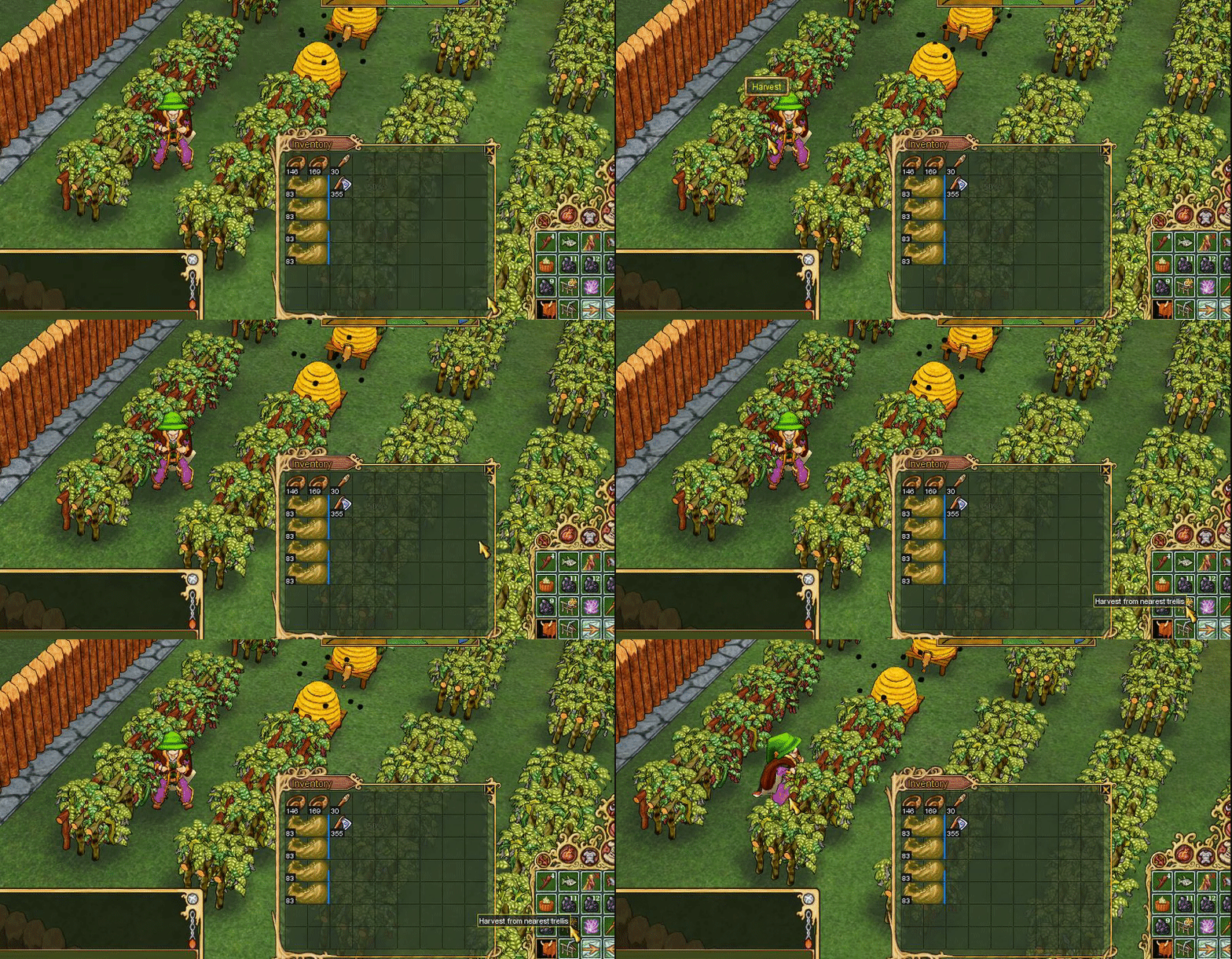
here you go romovs in the vid i can harvest the pepper manually but the button doesn't work.