Not familiar with what youre referencing, got a screenshot or something?Raguto wrote:Alright thanks, also is there a possibility in adding the tile grid setting that the ender client has?Ardennesss wrote:I'll be up for a few more hours, I'll dig through the patch changes and see if I can find what might've caused it.
-
Ardennesss

- Posts: 1171
- Joined: Sun Oct 06, 2013 4:22 pm
Re: Ardennes Hafen Client
-
Raguto
- Posts: 12
- Joined: Thu Feb 21, 2019 2:02 am
Re: Ardennes Hafen Client
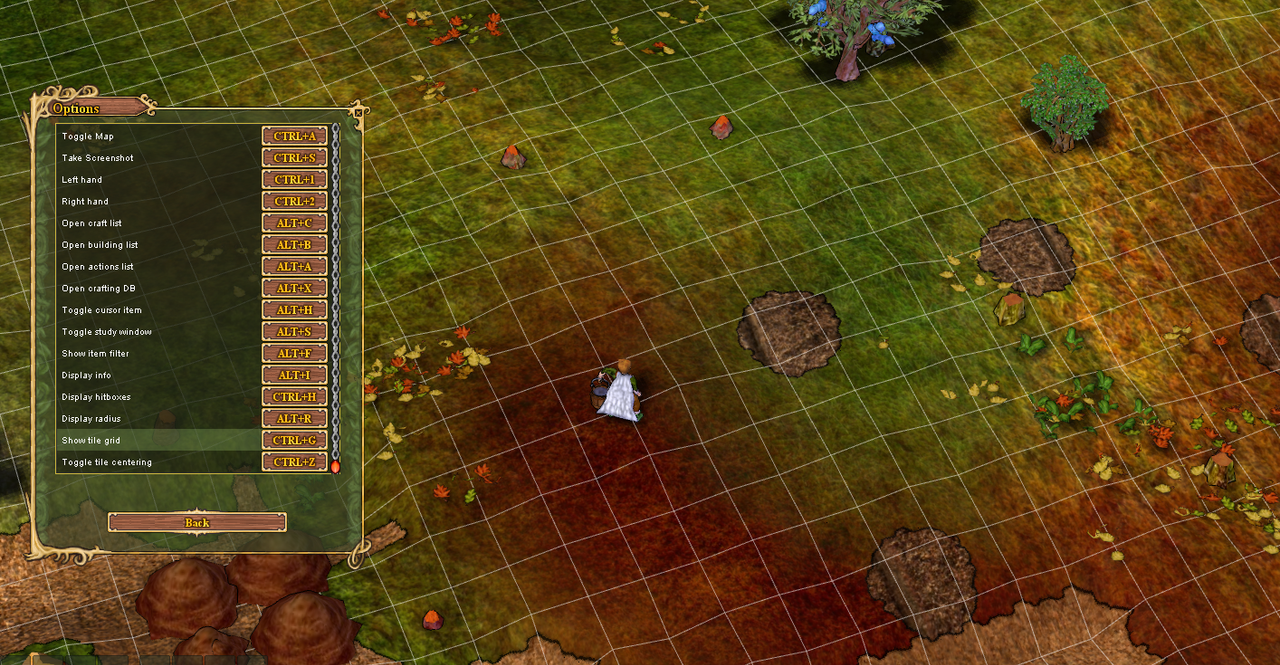
Yep, here it is. It's just convenient to show exactly where each square tile is.Ardennesss wrote:Not familiar with what youre referencing, got a screenshot or something?Raguto wrote:Alright thanks, also is there a possibility in adding the tile grid setting that the ender client has?Ardennesss wrote:I'll be up for a few more hours, I'll dig through the patch changes and see if I can find what might've caused it.
-
Ardennesss
- Posts: 1171
- Joined: Sun Oct 06, 2013 4:22 pm
Re: Ardennes Hafen Client
It's Ctrl-G on mine by default too, just not listed on keybindings which I should prob fix - will fix that. Did you have any luck getting on discord? Have an updated version I'd like you to try to see if it fixes it. Unsure how best to send it to you.
-
saronsen
- Posts: 4
- Joined: Wed Sep 05, 2012 6:20 am
Re: Ardennes Hafen Client
Is there a way to move UI elements? I can't see an option or a hotkey to enable the ability to do so.
-
Ardennesss
- Posts: 1171
- Joined: Sun Oct 06, 2013 4:22 pm
Re: Ardennes Hafen Client
Which UI elements specifically? If you're talking about the hot bars, hold ctrl and drag.saronsen wrote:Is there a way to move UI elements? I can't see an option or a hotkey to enable the ability to do so.
-
rhzk

- Posts: 289
- Joined: Wed Mar 16, 2016 4:10 am
Re: Ardennes Hafen Client
For some reason I can't start the client:
1.00.91.72434924
Windows 10 10.0 x64, 1.8.0_201 amd64
null
java.lang.NoClassDefFoundError: com/google/common/flogger/FluentLogger
at haven.DefSettings.<clinit>(DefSettings.java:40)
at haven.MainFrame.main2(MainFrame.java:348)
at haven.MainFrame.access$100(MainFrame.java:47)
at haven.MainFrame$7.run(MainFrame.java:387)
at java.lang.Thread.run(Unknown Source)
Caused by: java.lang.ClassNotFoundException: com.google.common.flogger.FluentLogger
at java.net.URLClassLoader.findClass(Unknown Source)
at java.lang.ClassLoader.loadClass(Unknown Source)
at sun.misc.Launcher$AppClassLoader.loadClass(Unknown Source)
at java.lang.ClassLoader.loadClass(Unknown Source)
... 5 more
-
saronsen
- Posts: 4
- Joined: Wed Sep 05, 2012 6:20 am
Re: Ardennes Hafen Client
Thats what it was, thanks a lot.Ardennesss wrote: hold ctrl and drag.
-
Ardennesss
- Posts: 1171
- Joined: Sun Oct 06, 2013 4:22 pm
Re: Ardennes Hafen Client
Need the new updater, can download from the same link in first post.rhzk wrote:For some reason I can't start the client:1.00.91.72434924
Windows 10 10.0 x64, 1.8.0_201 amd64
null
java.lang.NoClassDefFoundError: com/google/common/flogger/FluentLogger
at haven.DefSettings.<clinit>(DefSettings.java:40)
at haven.MainFrame.main2(MainFrame.java:348)
at haven.MainFrame.access$100(MainFrame.java:47)
at haven.MainFrame$7.run(MainFrame.java:387)
at java.lang.Thread.run(Unknown Source)
Caused by: java.lang.ClassNotFoundException: com.google.common.flogger.FluentLogger
at java.net.URLClassLoader.findClass(Unknown Source)
at java.lang.ClassLoader.loadClass(Unknown Source)
at sun.misc.Launcher$AppClassLoader.loadClass(Unknown Source)
at java.lang.ClassLoader.loadClass(Unknown Source)
... 5 more
-
rhzk
- Posts: 289
- Joined: Wed Mar 16, 2016 4:10 am
Re: Ardennes Hafen Client
It works now, thx! Oh wow, new UI. But now my UI windows doesn't save in place where I put them.Ardennesss wrote:Need the new updater, can download from the same link in first post.
-
Ardennesss
- Posts: 1171
- Joined: Sun Oct 06, 2013 4:22 pm
Re: Ardennes Hafen Client
The positions will be reset on the first login and they'll save after that.rhzk wrote:It works now, thx! Oh wow, new UI. But now my UI windows doesn't save in place where I put them.Ardennesss wrote:Need the new updater, can download from the same link in first post.
